SDK versioning
Speakeasy-generated SDKs are automatically versioned using Semantic Versioning (SemVer ). With each new generation, the SDK version is bumped up.
Versioning logic
The SDK version is automatically incremented based on three independent inputs: generator feature changes, OpenAPI document changes, and configuration changes. Each input is evaluated separately, and the largest bump across all three wins.
The precedence order is: major > minor > patch. For example, if generator features trigger a minor bump and the OpenAPI document triggers a major bump, the final result is a major bump.
Generator version changes
When Speakeasy releases a new generator version, it compares the features changed in the new generator to those used in the SDK:
- If multiple used features in the SDK change, the largest version bump (major, minor, patch) across all used features determines the version increment.
- If a generator feature that was previously tracked in
gen.lockis no longer present, that triggers a minor bump. - Features unaffected by the new generator version maintain the current version.
Configuration changes
- Changes to the
gen.yamlfile will bump the patch version. - Changes to the configuration checksum will also bump the patch version.
OpenAPI document changes
Versioning based on OpenAPI document changes works by comparing the info.version field between generations:
- If the
info.versionfield is a valid SemVer string, Speakeasy compares the previous and current values. A major or minor increment ininfo.versionbumps the SDK version correspondingly. - If
info.versionis not present, is not a valid SemVer string, or has not changed, Speakeasy falls back to a document checksum comparison. A checksum change triggers a patch bump. - Speakeasy does not currently analyze the actual content of the OpenAPI document (such as added or removed operations). Only the
info.versionfield and the overall document checksum are evaluated.
Pre-release version bumps
Speakeasy supports any SemVer-compatible string as a valid version, including pre-release versions such as X.X.X-alpha or X.X.X-alpha.X.
- When the current version has a pre-release suffix (for example,
1.0.0-alpha.1), automated bumps increment the pre-release counter instead of the main version segments. For example:1.0.0-alpha→1.0.0-alpha.1→1.0.0-alpha.2. - Pre-release versioning continues until explicitly exited.
- To exit pre-release versioning, set a new version manually, run
speakeasy bump graduate, or set theSPEAKEASY_BUMP_OVERRIDEenvironment variable tograduate. Agraduatebump strips the pre-release suffix entirely, promoting1.0.0-alpha.2to1.0.0.
Major version bumps
New SDKs start at version 0.0.1. Automatic major version bumps begin after reaching version 1.0.0. Breaking changes trigger major version increments after 1.0.0.
When a major bump is detected for a pre-v1 SDK (version below 1.0.0), Speakeasy automatically downgrades it to a minor bump. This also applies to Go SDKs regardless of version, because major version changes in Go require import path changes that significantly impact downstream users. This automatic downgrade does not apply when the bump was explicitly set via SPEAKEASY_BUMP_OVERRIDE=major.
Major version changes affect the Golang SDK migration path.
Golang major version bumps
Golang module versions above 1.0.0 require import path changes to include the major version. For example:
- Version
1.2.3:github.com/speakeasy/speakeasy-go - Version
2.0.0:github.com/speakeasy/speakeasy-go/v2
Consider Golang SDK major version changes carefully due to migration path impacts. The SDK maintainer determines when to increment major versions.
Overriding automatic versioning with an environment variable
Set the SPEAKEASY_BUMP_OVERRIDE environment variable to force a specific bump type, bypassing all automatic detection. Valid values are patch, minor, major, and graduate.
When set, this variable clears any bumps detected from generator features, OpenAPI document changes, or configuration changes, and applies only the specified bump type.
# Force a minor bump regardless of detected changes
SPEAKEASY_BUMP_OVERRIDE=minor speakeasy run

# Force graduation from pre-release
SPEAKEASY_BUMP_OVERRIDE=graduate speakeasy run
This is useful in CI/CD pipelines that require deterministic version control. Unlike the automatic major-bump downgrade for pre-v1 and Go SDKs, SPEAKEASY_BUMP_OVERRIDE=major applies the major bump as specified without any downgrade.
Disabling automatic versioning
To permanently disable automatic version bumping, set versioningStrategy to manual in the generation section of your gen.yaml file:
generation:
  versioningStrategy: manual
When set to manual, the SDK version will only change when you explicitly update the version field in your language-specific configuration or use speakeasy bump commands. This is useful when you want full control over SDK versioning and don’t want versions to change automatically based on spec, config, or generator changes.
Manual version bumps
Speakeasy supports manual control of SDK versioning through multiple methods.
Via gen.yaml
To override the automatic versioning logic for the next generation, set the version field in the gen.yaml file.
- The Speakeasy generator detects manual version settings when the
releaseVersionfield in thegen.lockfile differs from theversionfield in thegen.yamlfile. - Automatic versioning will resume when the version values in both files match (unless
versioningStrategyis set tomanual).
Via CLI commands
There are two CLI commands you can use to manage SDK versions:
-
Using
speakeasy run --set-version=...: This command allows you to specify a SemVer-compatible version when generating an SDK without modifying the gen.yaml file directly. This is a local change that will need to be pushed to GitHub to take effect.Examples:
speakeasy run --set-version=1.2.3- Sets the version to a standard releasespeakeasy run --set-version=1.2.3-rc.1- Sets the version to a release candidate
-
Using
speakeasy bump: Use the Speakeasy CLIbumpcommand to set the SDK version without manually editing thegen.yamlfile. This is a local change that will need to be pushed to GitHub to take effect.Examples:
speakeasy bump patch- Bumps the target’s version by one patch versionspeakeasy bump -v 1.2.3- Sets the target’s version to 1.2.3speakeasy bump -v 1.2.3-rc.1- Sets the target’s version to a release candidatespeakeasy bump major -t typescript- Bumps the typescript target’s version by one major versionspeakeasy bump graduate- Current version 1.2.3-alpha.1 sets the target’s version to 1.2.3
Via GitHub Pull Request Labels
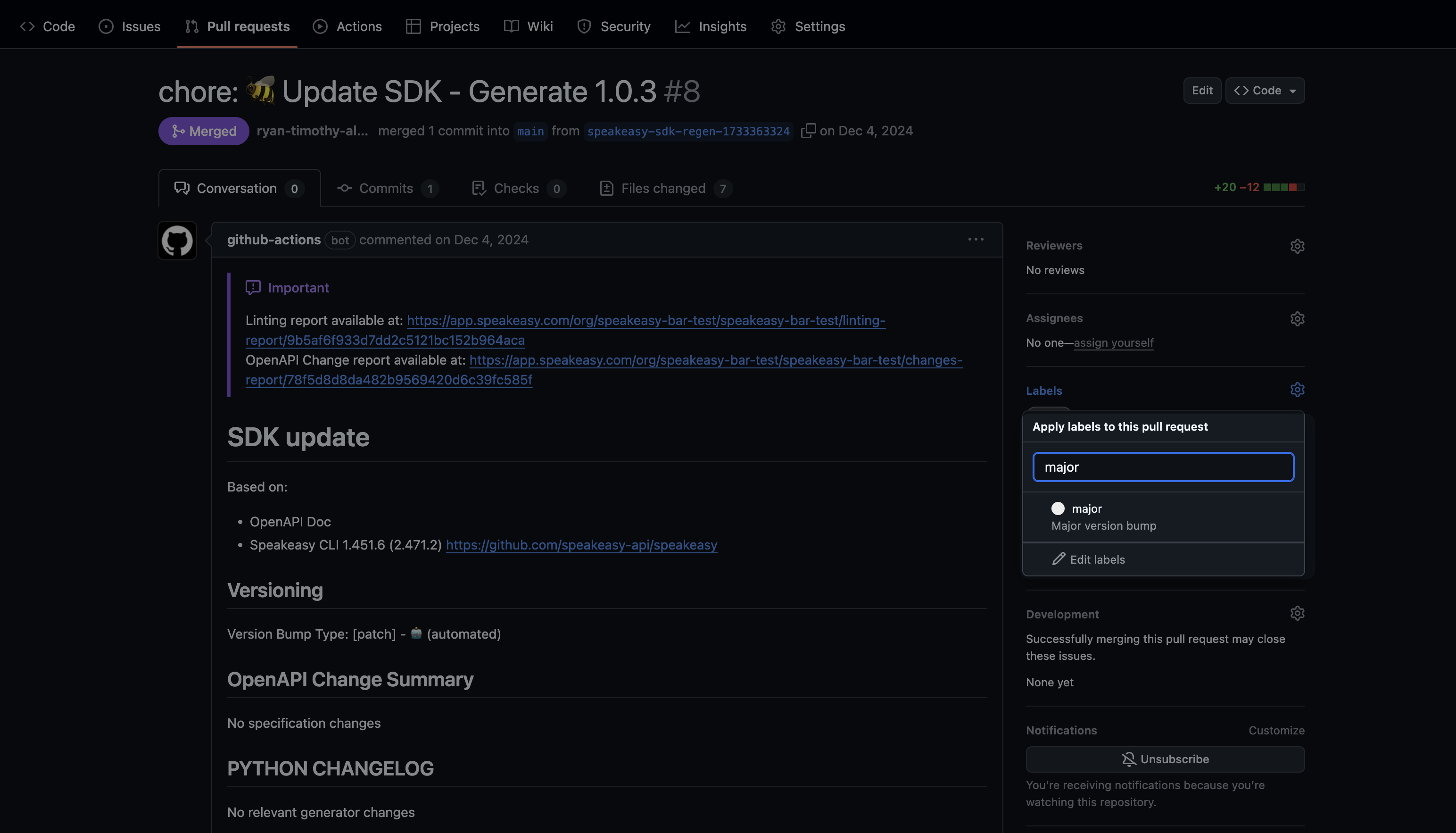
Speakeasy supports label-based versioning via GitHub pull request (PR) UI:
-
Automated version detection: The system analyzes changes and suggests the appropriate semantic version bump. The generated PR displays a suggested version label:
major,minor, orpatch. Apre-releaselabel is added for pre-release versions. -
Manual override option: Override the suggestion by removing the current label and adding a
major,minor, orpatchlabel to the PR. Use the bump typegraduateto move out of pre-release stage. The SDK version updates automatically on the next generation and persists across regenerations until changed.
- Immediate generation: Label-based versioning is active in all SDK generation workflows. On newer versions of the CLI, the default sdk_generation.yaml already has the labels trigger, so this step may no longer be required. If your workflow file doesn’t include this trigger, add the following action trigger to the GitHub workflow file (typically at
.github/workflows/sdk_generation.yaml):
name: Generate
permissions:
  checks: write
  contents: write
  pull-requests: write
  statuses: write
"on":
  workflow_dispatch:
    inputs:
      force:
        description: Force generation of SDKs
        type: boolean
        default: false
      push_code_samples_only:
        description: Force push only code samples from SDK generation
        type: boolean
        default: false
      set_version:
        description: optionally set a specific SDK version
        type: string
  pull_request:
    types: [labeled]
  schedule:
    - cron: 0 0 * * *
Via GitHub Actions
You can set the SDK version by manually running the GitHub workflow:
- Go to the Actions tab in your GitHub repository
- Select the SDK generation workflow
- Click “Run workflow”
- Use the “set_version” input to specify the desired version
- Click “Run workflow” to start the process
Last updated on