Frameworks
Automatically output OpenAPI from TypeScript with tsoa
Automatically output OpenAPI from TypeScript with tsoa
Anyone who has worked with OpenAPI specifications knows how useful they can be for documenting and sharing APIs. However, it can be a daunting task to create and maintain OpenAPI documents manually, especially as APIs evolve over time. Writing loads of OpenAPI by hand can be tedious and error-prone, but for years the only alternative was littering codebases with annotations. Fortunately, with tsoa (TypeScript OpenAPI), developers can write clean TypeScript code and generate OpenAPI specifications automatically.
How tsoa works
tsoa is a particularly clever tool. Powered by TypeScript’s brilliant type system, it integrates with popular web application frameworks like express, Koa, and Hapi, to generate routes and middlewares that now only generate OpenAPI documents. This means the application and the documentation are running from a single source of truth for the API, powering runtime validation, contract testing, SDK generation, and anything else that has an OpenAPI tool to do.
The types tsoa uses are standard TypeScript interfaces and types, meaning they can be used throughout an application the same as any other type.
export interface User { id: number; email: string; name: string; status?: "Happy" | "Sad"; phoneNumbers: string[];}Creating an OpenAPI document with tsoa
It’s easiest to imagine this being done on a brand new application, but it could be added to an existing codebase as well. Equally this is simpler to conceptualize when no OpenAPI exists already, but tooling exists to generate TypeScript types from OpenAPI as well. To keep things simple, this guide focuses on a new application and generates new OpenAPI.
Step 1: Set Up a New TypeScript Project
First, create a new directory for the project and initialize a new Node.js project with TypeScript support.
mkdir speakeasy-tsoa-examplecd speakeasy-tsoa-exampleyarn init -yyarn add tsoa expressyarn add -D typescript @types/node @types/expressyarn run tsc --initThere are two config files to set up here. First, configure tsconfig.json for tsoa:
{  "compilerOptions": {    "incremental": true,    "target": "es2022",    "module": "node18",    "outDir": "build",
    "strict": true,    "noUnusedLocals": true,    "noUnusedParameters": true,    "noImplicitReturns": true,    "noFallthroughCasesInSwitch": true,
    "moduleResolution": "node16",    "baseUrl": ".",    "esModuleInterop": true,    "resolveJsonModule": true,
    "experimentalDecorators": true,    "forceConsistentCasingInFileNames": true,    // Avoid type checking 3rd-party libs (e.g., optional Hapi/Joi types)    "skipLibCheck": true  },  "exclude": [    "./sdk",  ]}
There’s a fair few options there but it’ll help get tsoa running as expected. Now to configure tsoa itself, create a tsoa.json file in the root of the project:
{ "entryFile": "src/app.ts", "noImplicitAdditionalProperties": "throw-on-extras", "controllerPathGlobs": ["src/app/*Controller.ts"], "spec": { "outputDirectory": "build", "specFileBaseName": "openapi", "specVersion": 3.1 }, "routes": { "routesDir": "build" }}Note
In December 2025 tsoa added support for OpenAPI v3.1, in the version v7.0.0-alpha0. Legacy versions v3.0 and v2.0 are also supported, but with v3.2 already being out it’s good to work with the latest version all tools support. Speakeasy already supports v3.2, but will work with v3.1 documents just fine.
Make sure to set the specVersion in the tsoa.json file to 3.1 as shown above, or use 2 or 3 for older versions of OpenAPI.
{ "spec": { "specVersion": 3.1 }}Step 2: Define Models
This section defines a simple Booking model that can be used in the example application. Create a new file src/app/models/booking.ts and add something like this to describe all the properties that can be in this payload.
export interface Booking { id: string; trip_id: string; passenger_name: string; has_bicycle?: boolean; has_dog?: boolean;}This will create very rudimentary OpenAPI output but it can be enhanced further with comments and decorators. More on that later.
Step 3: Create a Service Layer
It’s a good idea to create a Service that handles interaction with the application’s models instead of shoving all that logic into the controller layer.
import { bookings } from "./fixtures";import { Booking } from "./models/booking";
export class BookingsService {  public list(page = 1, limit = 10): Booking[] {    const start = (page - 1) * limit;    return bookings.slice(start, start + limit);  }
  public get(bookingId: string): Booking | undefined {    return bookings.find((b) => b.id === bookingId);  }
  public create(input: Omit<Booking, "id">): Booking {    const id = crypto.randomUUID();    const booking: Booking = { id, ...input };    bookings.push(booking);    return booking;  }}
Step 4: Create a Controller
With the model and service layer set up, the next step is to create a controller to handle incoming HTTP requests. Create a new file src/app/bookingController.ts and add the following code:
import { Body, Controller, Delete, Get, Path, Post, Query, Res, Route, Tags, TsoaResponse } from "tsoa";import { Booking } from "./models/booking";import { BookingsService } from "./bookingsService";
@Route("bookings")@Tags("Bookings")export class BookingsController extends Controller {  @Get()  public async listBookings(    @Query() page?: number,    @Query() limit?: number  ): Promise<Booking[]> {    return new BookingsService().list(page ?? 1, limit ?? 10);  }
  @Get("{bookingId}")  public async getBooking(    @Path() bookingId: string,    @Res() notFound: TsoaResponse<404, { reason: string }>  ): Promise<Booking> {    const booking = new BookingsService().get(bookingId);    if (!booking) return notFound(404, { reason: "Booking not found" });    return booking;  }
  @SuccessResponse("201", "Created") // Custom success response  @Post()  public async createBooking(    @Body() requestBody: Omit<Booking, "id">  ): Promise<Booking> {    return new BookingsService().create(requestBody);  }}
This is the first sign of tsoa-specific code being brought into the application. Unlike older OpenAPI/Swagger tools like swagger-jsdoc, tsoa uses actual decorators that modify the behavior of the code at runtime, a huge improvement on the old code comments approach because they were just floating near the production code and could potentially disagree.
The @Route() decorator sets out the first chunk of the URI, so if the API is running on https://example.com/api/booking that is a server path of https://example.com/api/ and a @Route('bookings') to create the whole thing.
Additionally, we define 2 methods: listBookings to list all bookings with optional pagination, and getBooking to retrieve a specific booking by its ID. The createBooking method allows us to create a new booking by sending a POST request with the booking details in the request body. Each time these methods are decorated with HTTP method decorators like @Get() and @Post(), which map them to the corresponding HTTP methods, and providing extra URL path information where needed.
The @Get("{bookingId}") decorator indicates that this method will handle GET requests to the /bookings/{bookingId} endpoint, where {bookingId} is a path parameter that will be replaced with the actual booking ID when making the request. This syntax is closely mirroring OpenAPI’s path templating for compatibility reasons. Path templating refers to the usage of template expressions, delimited by curly braces (), to mark a section of a URL path as replaceable using path parameters.
Understanding parameters in OpenAPI will help learning how tsoa parameters, but put simply tsoa will allow 4 types of parameters: Path parameters (using @Path()), Query Parameters (@Query() or @Queries()), Header Parameters (@Header()) and Body Parameters (@Body() or individual properties using @BodyProp()).
Step 5: Set up the Express app
Let’s now create an app.ts and a server.ts file in our source directory like this:
import express, {json, urlencoded} from "express";import { RegisterRoutes } from "../build/routes";
export const app = express();
// Use body parser to read sent json payloadsapp.use(  urlencoded({    extended: true,  }));app.use(json());
RegisterRoutes(app);
Another file server.ts can be created to set the application to listen on a port:
import { app } from "./app";
const port = process.env.PORT || 3000;
app.listen(port, () =>  console.log(`Example app listening at http://localhost:${port}`));
This is a pretty standard express setup, but that RegisterRoutes import might look a little funny to anyone used to working with express alone.
Step 6: Building the routes file
At this point you may have noticed that TypeScript will not find the RegisterRoutes import from build/routes. That’s because we haven’t asked tsoa to create that yet. Let’s do that now:
mkdir -p buildyarn run tsoa routesThe tsoa routes command generates the routes file based on the controllers defined in the project. It reads the configuration from the tsoa.json file and creates the necessary route definitions in the specified output directory, putting the generated file into build/routes.ts.
This routes file is autogenerated and it is not necessary to know too much about how it works, but in short it maps the HTTP routes to the controller methods defined earlier, handling request validation and response formatting based on the decorators and types used in the controllers.
/* tslint:disable *//* eslint-disable */import type { TsoaRoute } from '@tsoa/runtime';import {  fetchMiddlewares, ExpressTemplateService } from '@tsoa/runtime';import { TripsController } from './../src/app/tripsController';import { StationsController } from './../src/app/stationsController';import { BookingsController } from './../src/app/bookingsController';import type { Request as ExRequest, Response as ExResponse, RequestHandler, Router } from 'express';
const models: TsoaRoute.Models = {    "Booking": {        "dataType": "refObject",        "properties": {            "id": {"dataType":"string","required":true},            "trip_id": {"dataType":"string","required":true},            "passenger_name": {"dataType":"string","required":true},            "has_bicycle": {"dataType":"boolean","default":false},            "has_dog": {"dataType":"boolean","default":false},        },        "additionalProperties": false,    },    // ... snipped for brevity};
// Then it autogenerates route handlers like:app.get('/bookings',  ...(fetchMiddlewares<RequestHandler>(BookingsController)),  ...(fetchMiddlewares<RequestHandler>(BookingsController.prototype.getBooking)),
  async function BookingsController_getBooking(request: ExRequest, response: ExResponse, next: any) {
Automatically generating the routes part may feel odd at first, but it may also feel like an incredibly welcome change as the tedious boilerplate has been handled automatically, and can be regenerated over and over as the application evolves.
Either way, with the build/routes.ts file now created, it’s time to compile TypeScript and start the server:
yarn run tscnode build/src/server.jsTip
It can be helpful to add these scripts to package.json at this point. This enables the use of yarn build and yarn start commands:
"main": "build/src/server.js","scripts": { "build": "tsoa spec-and-routes && tsc", "start": "node build/src/server.js"},Step 6: Generate the OpenAPI Spec
The final part is to generate OpenAPI from this application. The easiest way to do this is using the tsoa CLI by running the following command in the terminal:
yarn run tsoa spec# oryarn run tsoa spec --yamlDoing this will create a build/openapi.json or build/openapi.yaml document containing the OpenAPI description for the API. The YAML version is easier to read, as shown below.
openapi: 3.1.0info: title: speakeasy-tsoa-example version: 2.0.0 description: Speakeasy Train Travel tsoa API license: name: Apache-2.0 contact: name: "Speakeasy Support" email: support@speakeasy.comcomponents: schemas: Booking: properties: id: type: string description: Unique identifier for the booking. example: 3f3e3e1-c824-4d63-b37a-d8d698862f1d format: uuid trip_id: type: string description: Identifier of the booked trip. example: 4f4e4e1-c824-4d63-b37a-d8d698862f1d format: uuid passenger_name: type: string description: Name of the passenger. example: John Doe has_bicycle: type: boolean description: Indicates whether the passenger has a bicycle. example: true default: false has_dog: type: boolean description: Indicates whether the passenger has a dog. example: false default: false required: - id - trip_id - passenger_name type: object additionalProperties: falsepaths: /bookings: get: operationId: ListBookings responses: "200": description: Ok content: application/json: schema: items: $ref: "#/components/schemas/Booking" type: array tags: - Bookings security: [] parameters: - in: query name: page required: false schema: format: double type: number - in: query name: limit required: false schema: format: double type: number post: operationId: CreateBooking responses: "200": description: Ok content: application/json: schema: $ref: "#/components/schemas/Booking" tags: - Bookings security: [] parameters: [] requestBody: required: true content: application/json: schema: $ref: "#/components/schemas/Omit_Booking.id_"Not a bad start, but this can be improved by learning more about the decorators and options available in tsoa.
Step 7: Improving the OpenAPI Output
Improvements may well be an ongoing process, but the first and most important step is to make sure the TypeScript types representing “models” in the application are well defined. Adding comments to the properties of interfaces and types will help tsoa generate better descriptions in the OpenAPI document. Using a combination of JSDoc comments and tsoa decorators, developers can provide additional metadata for each property, such as examples, formats, and constraints.
export interface Booking {  /**   * Unique identifier for the booking.   * @format uuid   * @example "3f3e3e1-c824-4d63-b37a-d8d698862f1d"   * @readonly   */  id: string;
  /**   * Identifier of the booked trip.   * @format uuid   * @example "4f4e4e1-c824-4d63-b37a-d8d698862f1d"   */  trip_id: string;
  /**   * Name of the passenger.   * @example "John Doe"   */  passenger_name: string;
  /**   * Indicates whether the passenger has a bicycle.   * @default false   * @example true   */  has_bicycle?: boolean;
  /**   * Indicates whether the passenger has a dog.   * @default false   * @example false   */  has_dog?: boolean;}
Adding this extra context is not just beneficial for generating a more informative OpenAPI document, but it will power real runtime functionality too. Types will be checked and validated at runtime, preventing invalid requests getting anywhere near the application logic.
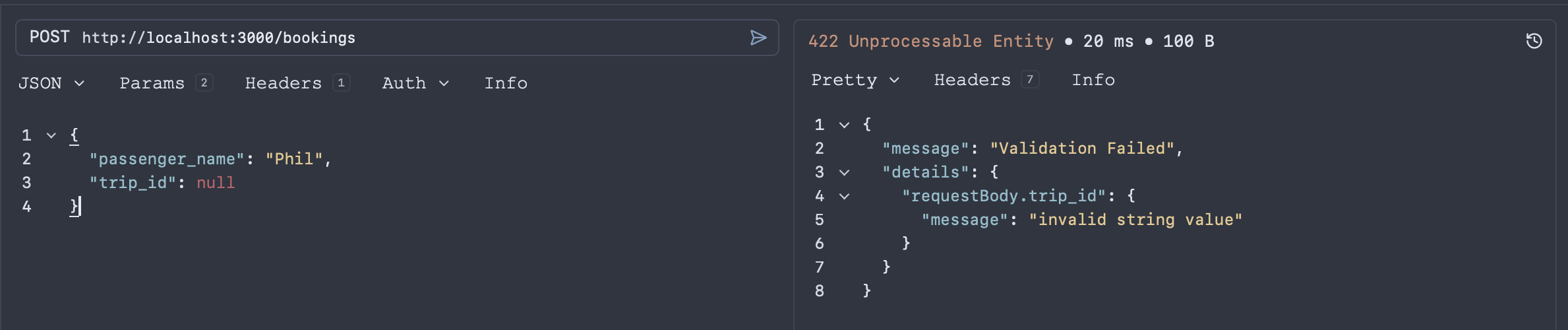
All sorts of things can happen with this extra metadata:
- Types will be checked and validated at runtime.
- Additional properties in JSON will trigger validation errors.
- Default values will actually be used when creating resources.
- Any
@readonlyproperties will be ignored when sent from request bodies.
Anyone up for a challenge can even add regex patterns to string properties using the @pattern decorator.
/** * Identifier of the booked trip. * @format uuid * @example "4f4e4e1-c824-4d63-b37a-d8d698862f1d" * @pattern ^[0-9a-fA-F]{8}\b-[0-9a-fA-F]{4}\b-[0-9a-fA-F]{4}\b-[0-9a-fA-F]{4}\b-[0-9a-fA-F]{12}$ */ trip_id: string;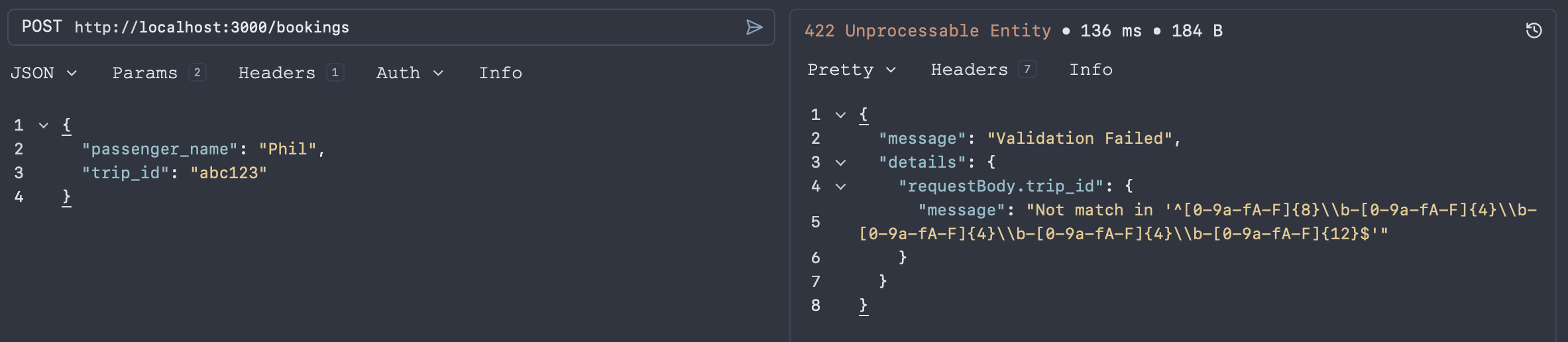
Tweak models like this and regenerate the OpenAPI to see the improvements reflected in the output.
(Optional) Step 8: Add a /docs endpoint to Serve OpenAPI Documentation
To make it easier to explore and share API documentation, add a /docs endpoint to the Express application that serves the OpenAPI document.
export const app = express();
// ... other middleware and route registrations
// Serve the OpenAPI specapp.use("/openapi.json", (req: ExRequest, res: ExResponse) => {  res.sendFile("openapi.json", { root: __dirname + "/../build" });});
// Serve API reference documentation using dynamic import (ESM-only package)(async () => {  const { apiReference } = await import("@scalar/express-api-reference");  app.use("/docs", apiReference({ url: "/openapi.json" }));})();
Improving OpenAPI output further
There are many more ways to improve the OpenAPI output generated by tsoa:
Set OpenAPI info section
By default tsoa will take values from package.json to popular the info section of the OpenAPI document, but the team maintaining the codebase might not the best point of contact to help public/external API consumers.
To manually configure the OpenAPI info section for contact and any other values, configure pop them in the “spec” portion of the tsoa.json file:
{ "entryFile": "src/app.ts", "noImplicitAdditionalProperties": "throw-on-extras", "controllerPathGlobs": ["src/app/*Controller.ts"], "spec": { "outputDirectory": "build", "specFileBaseName": "openapi", "specVersion": 3.1, "name": "Custom API Name", "description": "Custom API Description", "license": "MIT", "version": "1.1.0", "contact": { "name": "API Contact", "email": "help@example.com", "url": "http://example.com" } }}Reusable component schemas
This section shows how to help tsoa generate separate and reusable component schemas for a request body.
Consider the following Trip model:
export interface Trip {  /**   * Unique identifier for the trip.   * @format uuid   * @example "ea399ba1-6d95-433f-92d1-83f67b775594"   */  id: string;
  /**   * The origin station ID.   * @format uuid   * @example "efdbb9d1-02c2-4bc3-afb7-6788d8782b1e"   */  origin: string;
  /**   * The destination station ID.   * @format uuid   * @example "b2e783e1-c824-4d63-b37a-d8d698862f1d"   */  destination: string;
  /**   * Departure time in ISO 8601 format.   * @format date-time   * @example "2024-02-01T10:00:00Z"   */  departure_time: string;
  /**   * Arrival time in ISO 8601 format.   * @format date-time   * @example "2024-02-01T16:00:00Z"   */  arrival_time: string;
  /**   * The operator running the trip.   * @example "Deutsche Bahn"   */  operator: string;
  /**   * The cost of the trip.   * @example 50   */  price: number;
  /**   * Indicates whether bicycles are allowed on the trip.   * @default false   * @example true   */  bicycles_allowed?: boolean;
  /**   * Indicates whether dogs are allowed on the trip.   * @default false   * @example true   */  dogs_allowed?: boolean;}
The goal is to write a controller that updates the operator and price fields. The controller should take both fields as body parameters.
The example controller below is a starting point. Note how the body parameters operator and price are defined by passing the @BodyProp decorator to the controller function multiple times.
@Route("trips")export class TripsController extends Controller {  @Put("{tripId}")  public async updateTrip(    @Path() tripId: string,    @BodyProp() operator?: string,    @BodyProp() price?: number  ): Promise<Trip> {    const trip = new TripsService().updateTrip(      tripId,      operator,      price    );
    return trip;  }}
This would generate inline parameters without documentation for the UpdateTrip operation in OpenAPI, as shown in the snippet below:
requestBody: required: true content: application/json: schema: properties: operator: type: string price: type: number type: objectWhile perfectly valid, this schema is not reusable and excludes the documentation and examples from our model definition.
It is recommended to pick fields from the model interface directly and export a new interface. The TypeScript utility types Pick and Partial can be used to pick the operator and price fields and make both optional:
export interface TripUpdateParams extends Partial<Pick<Trip, "operator" | "price">> {}In the controller, TripUpdateParams can now be used as follows:
@Route("trips")export class TripsController extends Controller {  @Put("{tripId}")  public async updateTrip(    @Path() tripId: string,    @Body() requestBody: TripUpdateParams  ): Promise<Trip> {    const trip = new TripsService().updateTrip(tripId, requestBody);
    return trip;  }}
Customizing OpenAPI operationId Using tsoa
When generating an OpenAPI spec, tsoa adds an operationId to each operation.
The operationId can be customized in three ways:
- Using the
@OperationIddecorator. - Using the default tsoa
operationIdgenerator. - Creating a custom
operationIdtemplate.
Using the @OperationId decorator
The most straightforward way to customize the operationId is to add the @OperationId decorator to each operation.
In the example below, the custom operationId is updateTripDetails:
@Route("trips")export class TripsController extends Controller {  @OperationId("updateTripDetails")  @Put("{tripId}")  public async updateTrip(    @Path() tripId: string,    @Body() requestBody: TripUpdateParams  ): Promise<Trip> {    const trip = new TripsService().updateTrip(tripId, requestBody);
    return trip;  }}
Using the default operationId generator
If a controller method is not decorated with the OperationId decorator, tsoa generates the operationId by converting the method name to title case using the following Handlebars template:
{{titleCase method.name}}Creating a custom operationId template
To create a custom operationId for all operations without the @OperationId decorator, tsoa allows a Handlebars template to be specified in tsoa.json. tsoa adds two helpers to Handlebars: replace and titleCase. The method object and controller name get passed to the template as method and controllerName.
The following custom operationId template prepends the controller name and removes underscores from the method name:
{ "spec": { "operationIdTemplate": "{{controllerName}}-{{replace method.name '_' ''}}" }}Add Speakeasy extensions to methods
Sometimes OpenAPI’s vocabulary is insufficient for certain generation needs. For these situations, Speakeasy provides a set of OpenAPI extensions. For example, an SDK method may need a name different from the OperationId. To cover this use case, Speakeasy provides an x-speakeasy-name-override extension.
To add these custom extensions to an OpenAPI spec, it is possible to make use of tsoa’s @Extension() decorator:
@Route("trips")export class TripsController extends Controller {  @OperationId("updateTripDetails")  @Extension({"x-speakeasy-name-override":"update"})  @Put("{tripId}")  public async updateTrip(    @Path() tripId: string,    @Body() requestBody: TripUpdateParams  ): Promise<Trip> {    const trip = new TripsService().updateTrip(tripId, requestBody);
    return trip;  }}
Add retries to Speakeasy SDKs
Speakeasy can generate SDKs that follow custom rules for retrying failed requests. For instance, if a server fails to return a response within a specified time, it may be desirable for client applications to retry their request without clobbering the server.
Add retries to SDKs generated by Speakeasy by adding a top-level x-speakeasy-retries schema to your OpenAPI spec. You can also override the retry strategy per operation by adding x-speakeasy-retries.
Adding Global Retries
To add a top-level retries extension to your OpenAPI spec, add a new spec schema to the spec configuration in tsoa.json:
{ "spec": { "spec": { "x-speakeasy-retries": { "strategy": "backoff", "backoff": { "initialInterval": 500, "maxInterval": 60000, "maxElapsedTime": 3600000, "exponent": 1.5 }, "statusCodes": ["5XX"], "retryConnectionErrors": true } } }}Adding retries per method
To add retries to individual methods, use the tsoa @Extension decorator.
In the example below, we add x-speakeasy-retries to the updateTrip method:
@Route("trips")export class TripsController extends Controller {  @Put("{tripId}")  @Extension("x-speakeasy-retries", {    strategy: "backoff",    backoff: {      initialInterval: 500,      maxInterval: 60000,      maxElapsedTime: 3600000,      exponent: 1.5,    },    statusCodes: ["5XX"],    retryConnectionErrors: true,  })  public async updateTrip(    @Path() tripId: string,    @Body() requestBody: TripUpdateParams,  ): Promise<Trip> {    const trip = new TripsService().updateTrip(tripId, requestBody);
    return trip;  }}
Generate an SDK based on the OpenAPI output
Once an OpenAPI spec is available, use Speakeasy to generate an SDK by calling the following in the terminal:
speakeasy quickstartFollow the onscreen prompts to provide the necessary configuration details for the new SDK such as the name, schema location and output path. Enter build/openapi.json when prompted for the OpenAPI document location and select TypeScript when prompted for which language should be generated.
SDKs can be generated using Speakeasy whenever the API definition in tsoa changes. Many Speakeasy users add SDK generation to their CI workflows to ensure SDKs are always up to date.
Summary
This guide explored how to use tsoa to automatically generate OpenAPI specifications from TypeScript applications. It covered setting up a new TypeScript project, defining models, creating a service layer and controllers, and generating the OpenAPI document. It also discussed ways to improve the OpenAPI output using decorators and comments, as well as adding Speakeasy extensions for SDK generation.